Halaman

WARNING!!
Please do not post links crack / patch in your comment

Showing posts with label Database. Show all posts

Wednesday, May 2, 2012

Connection String

Kalau kita sering membuat program yang terkoneksi ke database , tentu sudah tidak asing lagi dengan yang namanya Connection String, yaitu cara koneksi dari program ke database yang di tuju. Setiap database mempunyai cara tersendiri untuk koneksinya.

Untuk koneksi ke database yang kita tuju kita bisa mengetahui caranya dengan mengunjungi ke situs khusus untuk connection string, ada berbagai macam database yang bisa kita pelajari dan bisa kita pakai untuk program yang kita buat, alamatnya sebagai berikut :

Database Servers
Data Files
Miscellaneous
SQL Server 2008 Excel 2007 SQL Azure
SQL Server 2005 Excel Integration Services
SQL Server 2000, 7.0 Textfile OLAP, Analysis Services
SQL Server Compact Edition Access 2007 SharePoint
Oracle Access MS Project
IBM DB2 Visual FoxPro / FoxPro 2.x Active Directory
MySQL DBF / FoxPro Exchange
Sybase Advantage Database Server SQLite Intuit QuickBase
Sybase Adaptive Server Enterprise Filemaker Composite Information Server
Informix Lotus Notes
Postgre SQL DSN
IBM UniVerse UDL
IBM UniData Index Server
AS/400 (IBM iSeries) HTML Table
Progress ComputerEase
Firebird
Interbase
Paradox
Ingres
Mimer SQL
Lightbase
Pervasive
SQLBase
Caché
Teradata
VistaDB
DBMaker
Netezza DBMS
Valentina
EffiProz


Semoga membantu.
Salam

Thursday, April 26, 2012

Master Detail - Simple Sample

Master Detail dibutuhkan untuk menyimpan data / informasi yang saling berhubungan antar beberapa Tabel dalam database. Biasanya informasi di Master/Header berisi informasi/data global, sedangkan untuk detailnya berisi informasi/data yang lebih terperinci.

Dalam contoh ini , saya hanya membuat sample program yang sangat sederhana tetapi setidaknya sudah menggambarkan dari Master Detail tersebut.
Beberapa hal yang penting disini adalah :
1. Membuat Table On The Fly
2. Menghubungkan antara control (TextBox) dengan gridview
3. Menampilkan Data ke Gridview dan manipulasi data di Grid
4. Mengambil nilai di GridView dan menampilkannya ke Control (TextBox)
5. Dan lainnya


Dalam contoh di atas, seperti permintaan dari beberapa rekan sekalian, yaitu bagaimana memasukkan TextBox (No Trans) kedalam GridView, kemudian menampilkan hasil Total di GridView (Value) ke dalam TextBox pada saat Runtime (seperti program POS / Cashier).


Mudah-mudahan dapat menjawab beberapa pertanyaan dari rekan-rekan sekalian.

Salam
Udin Sofyan


Download
MasterDetail


Wednesday, April 25, 2012

Microsoft® SQL Server® 2012 Evaluation


 Microsoft SQL Server 2012 enables a cloud-ready information platform that will help organizations unlock breakthrough insights across the organization.


File name     Size
ENU\SQLFULL_ENU.iso     4.2 GB     Download
ENU\x64\SQLFULL_x64_ENU_Core.box     1.8 GB     Download
ENU\x64\SQLFULL_x64_ENU_Install.exe     94 KB     Download
ENU\x64\SQLFULL_x64_ENU_Lang.box     655.8 MB     Download
ENU\x86\SQLFULL_x86_ENU_Core.box     1.6 GB     Download
ENU\x86\SQLFULL_x86_ENU_Install.exe     94 KB     Download
ENU\x86\SQLFULL_x86_ENU_Lang.box     642.0 MB     Download


Overview


Microsoft SQL Server 2012 enables a cloud-ready information platform that will help organizations unlock breakthrough insights across the organization as well as quickly build solutions and extend data across on-premises and public cloud backed by capabilities for mission critical confidence.


  • Deliver required uptime and data protection with AlwaysOn
  • Gain breakthrough & predictable performance with ColumnStore Index
  • Help enable security and compliance with new User-defined Roles and Default Schema for Groups
  • Enable rapid data discovery for deeper insights across the organization with ColumnStore Index
  • Ensure more credible, consistent data with SSIS improvements, a Master Data Services add-in for Excel, and new Data Quality Services
  • Optimize IT and developer productivity across server and cloud with Data-tier Application Component (DAC) parity with SQL Azure and SQL Server Data Tools for a unified dev experience across database, BI, and cloud functions

Microsoft SQL Server 2012 Documentation:


Note:


  1. This fully functional trial software will automatically expire after six months. You can obtain the fully licensed version at any time. For information about the different editions of Microsoft® SQL Server® 2012, see the see the Editions page.
  2. Some components in this release have certain Internet-enabled features, including the Customer Experience Improvement Program and Error and Usage Reporting component, enabled by default to help us identify and address issues that you may encounter while using SQL Server. For more information and instructions on how to disable these features, see the Microsoft SQL Server 2012 Privacy Statement.
  3. Some components in this software have two different methods to complete the installation process:
    • Attended Installation – an interactive user interface will guide you through the set-up process and obtain all of the information and consent required to complete the installation. This includes displaying, acknowledgement, and archiving of the applicable SQL Server license terms.

    • Unattend Installation – this is a command line set-up process that does not have an interactive user interface to guide you through the set-up process. In this case, you will be required to enter a parameter during installation that indicates your acceptance of the license terms 

System requirements


Supported operating systems: Windows 7, Windows Server 2008 R2, Windows Server 2008 Service Pack 2, Windows Vista Service Pack 2
  • 32-bit systems
    • Computer with Intel or compatible 1GHz or faster processor (2 GHz or faster is recommended.)
  • 64-bit systems
    • 1.4 GHz or faster processor
  • Minimum of 1 GB of RAM (2 GB or more is recommended.)
  • 2.2 GB of available hard disk space


Detail :
http://www.microsoft.com/download/en/details.aspx?id=29066
http://www.microsoft.com/sqlserver/en/us/sql-2012-editions.aspx


Friday, December 23, 2011

Microsoft SQL Server 2008 R2 Express Edition

Easy to get. Free to use.


SQL Server Express is a free edition of SQL Server ideal for developing and powering desktop, web and small server applications. Download SQL Server 2008 R2 Express or try SQL Server 2012 Express RC0, which includes SQL Server Express LocalDB, a new lightweight deployment option for Express.

Top Express Features
  • Same database engine as other versions of SQL Server.
  • Supports 10 GB of storage per database.
  • Backup and restore with ease.
  • Compatible with all editions of SQL Server and SQL Azure.
  • Designed to work with Visual Studio and ASP.NET.
  • Available with a graphical management tool.
  • Offers reporting capabilities, full-text search, and spatial support. 


Faster development
Take advantage of existing Transact-SQL skills, and incorporate technologies, including the Microsoft ADO.NET Entity Framework and LINQ. Develop applications faster through deep integration with Visual Studio 2008, Visual Web Developer 2008, and SQL Server Management Studio.

Development acceleration
Model data by using the ADO.NET Entity Framework to hide database schema details and access data by using entities that closely resemble business logic. Take advantage of support for LINQ, including LINQ to SQL and LINQ to Entities, which allows data to be retrieved from entities natively from any Microsoft .NET language.

Improved developer productivity
Increase developer productivity and simplify deployment through integration with Visual Studio 2008 and Visual Web Developer. Take advantage of advanced capabilities, including rich table and query designers, full integration with Server Explorer, and drag-and-drop IDE support, for rapidly building data-bound applications. Access data with PHP by using the SQL Server driver for PHP.

Easy design process
Manage SQL Server 2008 R2 Express databases with SQL Server Management Studio Express. Connect to local SQL Server 2008 R2 Express databases and manage objects with full Object Explorer integration. Write, execute, and test queries by using visual query plans that provide hints to tune queries and access management and maintenance options.
Robust applications
Create applications by using advanced features while centralizing business logic and increasing application performance with stored procedures, CLR integration, triggers, and views. Dynamically respond to data changes by using query notification, and extend data to remote locations with Service Broker and Replication.

Management of any data type
Take advantage of data, including support for structured and unstructured data while storing business data with native support for relational data, XML, and spatial data. Store and validate XML data and use XQuery to retrieve data. Increase granularity of temporal data with data types such as date and time.

Data mapping
Add geographical information to business applications and build location-aware applications.

Relevant information delivery
Visualize data by using Reporting Services and create readable reports that answer complex user questions. Enable users to share reports by using Microsoft Word and Microsoft Excel.


Anywhere data access
Create occasionally connected applications that function even when disconnected from the network. Develop desktop applications that automatically synchronize with central databases.

Simple remote management
Manage data infrastructures with policy-based management and apply policies to all instances. Reduce maintenance time by defining common policies for operations, such as query optimizations, naming conventions, backup, restore, and index management. Apply policies to multiple servers for consistent management across the enterprise.

Corporate data synchronization
Keep data synchronized with subscriber support for SQL Server transactional and merge replication. Take advantage of advanced conflict resolution capabilities to build robust business solutions, and synchronize data automatically with support for change tracking and the Microsoft Sync Framework.


System requirements


Supported Operating Systems: Windows Server 2003 Service Pack 2, Windows Server 2008, Windows Vista, Windows Vista Service Pack 1, Windows XP Service Pack 2, Windows XP Service Pack 3


  • 32-Bit Systems: Computer with Intel or compatible 1GHz or faster processor (2 GHz or faster is recommended. Only a single processor is supported)
  • 64-Bit Systems: 1.4 GHz or higher processor (2 GHz or faster is recommended. Only a single processor is supported)
  • Minimum of 256 MB of RAM (1 GB or more is recommended)
  • 1 GB of free hard disk space

Instructions


Note: You must have administrative rights on the computer to install SQL Server 2008 Express.

We recommend that you read the Release Notes and Readme before installing SQL Server 2008 Express.


    Step 1: Download and install Microsoft .Net Framework 3.5 SP1.

    Step 2: Download and install Windows Installer 4.5.

    Step 3: Download SQL Server 2008 Express by clicking the appropriate link later on this page. To start the installation immediately, click Run. To install SQL Server Express at a later time, click Save.

    Note: Note: SQL Server 2008 Express includes both 32-bit and 64-bit versions. SQLEXPR32_x86 is a smaller package that can be used to install SQL Server 2008 Express onto only 32-bit operating systems. SQLEXPR_x86 is the same product but supports installation onto both 32-bit and 64-bit (WoW) operating systems. SQLEXPR_x64 is a native 64-bit SQL Server 2008 Express and supports installation onto only 64-bit operating systems. There is no other difference between these packages.

Hanya sharing saja, bagus juga untuk digunakan karena kapasitasnya sudah semakin besar dari 4 GB sekarang menjadi 10 GB per databasenya, buat temen temen daripada pakai yang ilegal coba mulai pakai yang versi ini, lumayan lama juga untuk mencapai 10 GB.


Saya pakai untuk perusahaan Retail dengan transaksi minimal 2500 per hari untuk program yang didalamnya ada transaksi Penjualan, Keuangan dan Accounting kemudian Gudang dan Ekspedisi sehingga setelah di ujicoba ternyata untuk 1 tahun perlu 2 GB , jadi kalau pakai versi ini setidaknya bisa 5 tahun, tapi saya setiap 3 tahun sekali juga di potong databasenya biar selalu ringan, jadi pakai versi ini sudah sangat cukup. Saya mencobanya tidak pakai Store Prosedure atau Trigger, untuk transaksi saya full pakai program. Seperti yang saya bilang, ini hanya sharing dan bukan promosi, saya yakin teman teman juga punya database sendiri yang sudah biasa digunakan, ini hanya info saja barangkali ada yang belum tahu.

Tuesday, December 20, 2011

MySQL Community Server


MySQL Community Edition is a freely downloadable version of the world's most popular open source database that is supported by an active community of open source developers and enthusiasts.
MySQL Cluster Community Edition is available as a separate download. The reason for this change is so that MySQL Cluster can provide more frequent updates and support using the latest sources of MySQL Cluster Carrier Grade Edition.


  • MySQL Connectors

  • MySQL offers standard database driver connectivity for using MySQL with applications and tools that are compatible with industry standards ODBC and JDBC.
    • Connector/ODBC(Current Generally Available Release: 5.1.9)Standardized database driver Windows, Linux, Mac OS X, and Unix platforms.Download
    • Connector/J(Current Generally Available Release: 5.1.18)Standardized database driver for Java platforms and development.Download
    • Connector/Net(Current Generally Available Release: 6.4.4)Standardized database driver for .NET platforms and development.Download
    • Connector/MXJ(Current Generally Available Release: 5.0.12)MBean for embedding the MySQL server in Java applications.Download
    • Connector/C++(Current Generally Available Release: 1.1.0)Standardized database driver for C++ development.Download
    • Connector/C (libmysql)(Current Generally Available Release: 6.0.2)A client library for C development.Download
    • MySQL native driver for PHP (mysqlnd)The MySQL native driver for PHP is an additional, alternative way to connect from PHP 6 to the MySQL Server 4.1 or newer.More Info


    Tuesday, November 1, 2011

    Oracle Developer Tools for Visual Studio

    The Oracle Developer Tools for Visual Studio (ODT) is a tightly integrated "Add-in" for Microsoft Visual Studio. ODT is free and the new 11.2.0.1.2 production release now offers support for Visual Studio 2010. Visual Studio 2008, and Visual Studio 2005 are also supported.
    • Integration with Visual Studio: Use Server Explorer to browse your Oracle schema and launch one of the many integrated Oracle designers and wizards to create and alter schema objects. Use Microsoft Query Designer to visually design queries.
    • Automatic .NET Code Generation: Use the Visual Studio Datasources Window, the Dataset Designer, and the TableAdapter Configuration Wizard to drag and drop and automatically generate .NET code.
    • Easy ASP.NET Web Development: If you're an ASP.NET web developer, ODT makes it easy to generate ASP.NET web applications with minimal coding required.
    • Powerful Application Tuning Tools: New! Use Oracle Performance Analyzer to tune your .NET application's use of Oracle Database via a single click of a button. The database is then monitored under load and recommendations are made, such as modifications to SQL or adding an index on a table. You can also tune Ad-hoc SQL statements in Query Window with SQL Tuning Advisor.
    • SQL Script Lifecycle with Source Control Integration: Generate SQL scripts for Oracle schema objects that your .NET application uses, manage them in an Oracle Database Project, check them into source control, edit the scripts in the Oracle SQL Editor, and execute them with a built in SQL*Plus execution engine.
    • PL/SQL Editor and Debugger: The fully integrated PL/SQL Editor and Debugger allows you to leverage all of your favorite Visual Studio debugging features from within PL/SQL code. You can even seamlessly step from your .NET code into your PL/SQL stored procedure code and back out again!
    • NET Stored Procedure Deployment: The .NET Deployment Wizard makes it easy to deploy .NET stored procedures and functions into Oracle Database.
    • Integrated Online Help System: The integrated context sensitive online help, including the Oracle SQL and PL/SQL Users Guides puts the Oracle documentation at your fingertips.
    • Manage Users, Roles and Privileges: New! Create Users and Roles using graphical designers. Assign privileges to the roles and assign roles to users. View the Users and Roles in Server Explorer.
    • Oracle Advanced Queuing (AQ) Designers: New! Create, modify and administer your Queues and Queue Tables.
    • User-Defined Types (UDTs): Create UDTs in Oracle with multiple new designers. A powerful UDT Custom Class code generation wizard makes using UDTs from .NET code easy and fast.
    • Import Table Wizard: This wizard makes it easy to import tables and their data from Oracle databases, or from external datasources such as Microsoft SQL Server, Microsoft Access and Excel spreadsheets.
    • Data Editing, Stored Procedure Testing, Adhoc SQL Execution: When testing your .NET application you can use the Oracle Data Window to insert and update Oracle data. There's also a testbed for testing stored procedures and an Oracle Query Window for executing any SQL statement you choose.

    Download:
     Download ODT 11.2.0.1.2 New! This release adds new support for Visual Studio 2010!

    Watch Video Demonstrations:
     Introduction to ODT (External link to Microsoft Developer Network) New!


    Guided Walkthroughs:
     Oracle by Example: SQL Tuning Advisor and Oracle Performance Analyzer New!
     Oracle by Example: Building ASP.NET Web Applications with ODT
     Oracle by Example: Building .NET Applications Using ODT
     Oracle by Example: Debugging Oracle PL/SQL from Visual Studio
     Oracle by Example: Using Oracle User-Defined Types with .NET and Visual Studio

    for more info, please click here

    Wednesday, October 19, 2011

    Microsoft OLEDB : provider is not registered on the local machine

    Pernah mengalami error seperti dibawah ini ketika anda menggunakan OleDb atau menggunakan Database Access (saya gunakan Access 2007).


    Komputer yang saya gunakan adalah Windows 7 professional x64 dengan Visual Studio 2008,
    Sampai saat ini belum ada OleDb untuk x64 bit, yang tersedia sampai saat saya tulis ini masih untuk versi x32 bit, bagaimana solusinya jika anda menggunakan Visual Studio ?

    Caranya adalah sebagai berikut :
    1. Anda ke Main Project anda (Project Utama), atau MyProject kemudian Double Click
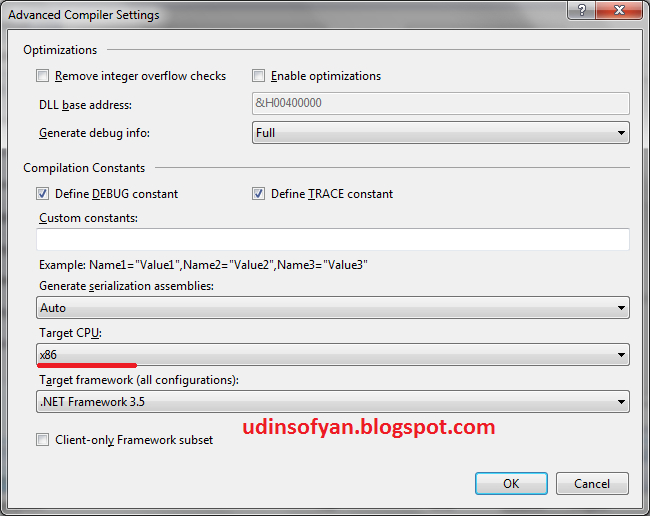
    2. Anda Pilih Compile --> AdvancedCompile Options
    3. Akan muncul menu seperti di bawah ini, kemudian cari Target CPU --> x86


    Pertanyaannya adalah apakah masih bisa jalan jika kita deploy ke komputer yang menggunakan x64 bit ? TIDAK MASALAH, program anda masih tetap jalan seperti biasa.

    Jika telah selesai pastikan tekan tombol OK, kemudian jalankan program anda kembali...
    Semoga membatu....


    Salam

    Tuesday, October 11, 2011

    Microsoft SQL Server 2005/2008 : Suspect Database

    Pernah mengalami Suspect Mode di database MS. Sql 2005/2008 ? mudah-mudahan belum, tapi untuk jaga-jaga berikut jika mengalami hal tersebut maka saatnya menggunakan Emergency Mode.

    EMERGENCY MODE digunakan ketika log transaksi untuk database telah rusak dan tidak ada backup yang tersedia untuk memulihkan. Dalam hal ini, perbaikan rutin tidak bisa terjadi jika transaksi log rusak.
    Sebelum melakukan ini, baiknya anda backup terlebih dahulu, jika backup seperti biasa tidak bisa, anda harus copy paste file mdf dan log file tersebut secara manual dengan mematikan terlebih dahulu Sql Agent dan lainnya dari Service milik Windows...


    Jika telah selesai backup/copy, hidupkan kembali Sql Agent-nya kemudian lakukan ini di New Query spt berikut :
    EXEC sp_resetstatus namaDB;
    ALTER DATABASE namaDB SET EMERGENCY
    DBCC checkdb(namaDB)
    ALTER DATABASE namaDB SET SINGLE_USER WITH ROLLBACK IMMEDIATE
    DBCC CheckDB (namaDB, REPAIR_ALLOW_DATA_LOSS)
    ALTER DATABASE namaDB SET MULTI_USER

    Semoga berhasil

    Salam

    Thursday, January 13, 2011

    Restore Database SQL Server 2000 Tanpa LOG File

    Pernah kejadian, karna LOG file Databasenya terlalu besar maka LOG file tersebut menjadi hilang, sehingga database menjadi Suspect, setelah mencari-cari akhirnya dapat juga solusinya seperti ini , mungkin ada yang lebih baik lagi , mudah-mudahan dapat berguna :

    1.Pastikan Database MDF sudah di Backup/dicopykan ke tempat penyimpanan lain, sehingga jika terjadi kerusakan pada saat restore data masih ada backupnya
    2.Dari Interprise Manager, pilih Database yang Suspect (rusak), kemudian Klik Kanan tombol Mouse --> All Task --> Detact Database, maka database tersebut akan terhapus, tetapi file MDF-nya masih tetap ada.
    3.Kemudian buat Database baru yang sama persis dengan database yang rusak, tetapi untuk penyimpanan Database (MDF) dan File LOG di tempatkan di directory yang berbeda dengan yang lama.
    4.Matikan SQL Server, kemudian copykan database yang lama (MDF) ke database yang baru di buat, setelah itu hidupkan kembali SQL Server, maka database yang baru menjadi Suspect
    5. Pindahkan ke Emergency Mode, Caranya :
    - Dari Interprise Manager pilih Database Root seperti di bawah ini, kemudian pilih Properties


    - Kemudian Pilih Tab ‘Server Setting’, kemudian beri tanda Centang pada ‘ Allow modification to be made directly system catalog’. Kemudian klik ok


    6. Setelah itu ke ‘master’ database (bawaan dari SQL Server), kemudian cari table ‘sysdatabases’, buka table tersebut, kemudian pada kolom ‘status’ ganti angkanya menjadi 32768’

    7. Matikan SQL Server, kemudian hidupkan kembali (walaupun masih Emergency Mode/Suspect, tetapi sekarang sudah punya LOG file).

    8. Selanjutnya tinggal lakukan Import Data.

    9. Selesai

    Umumnya, data hasil Import/Export tidak menghasilkan Index, untuk itu database yang telah di Import harus di Re-Index ulang.

    Search This Blog